Your First Hack: A Guided Walkthrough
Time to put it together. You will do genuine reconnaissance and find a flag hidden in this site — the same technique real hackers use every day.
Recon: Read the Page Source
Every hack starts by looking closely
When a browser shows you a web page, it is really displaying HTML — the code the server sent. That code often contains comments and hints developers forgot to remove. Reading it is called viewing the source, and it is the very first skill in web hacking.
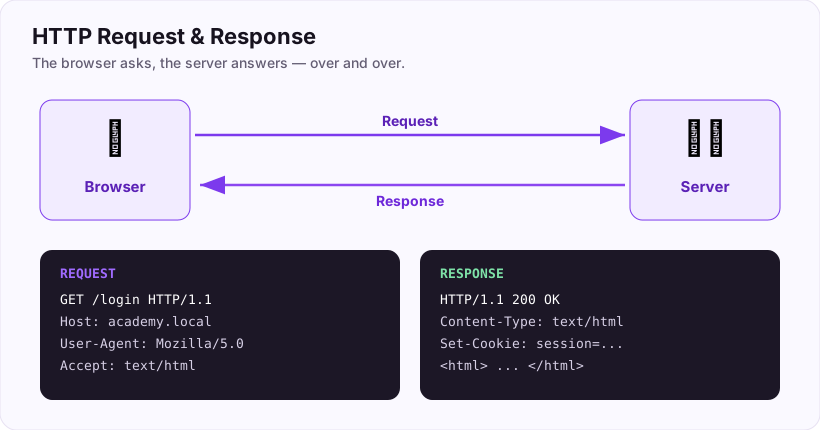
There is a flag hidden in the source of this website right now. Let us find it together.
- Right-click anywhere on this page and choose View Page Source (or press Ctrl+U). A new tab opens showing the raw HTML.
- Press Ctrl+F to search within that source, and type
ASEC{. - You will land on a hidden HTML comment — the kind wrapped in
<!-- ... -->. Inside it is your flag.
Copy the flag you found and submit it below.
What flag is hidden in this website's page source? (format ASEC{...})
+20 ptsNeed a hint?
Press Ctrl+U, then Ctrl+F and search for ASEC{What "A Hack" Really Means
It is a process, not magic
Movies show hacking as furious typing and instant access. Reality is calmer and far more learnable: hacking is a process — a repeatable series of steps you follow every single time.
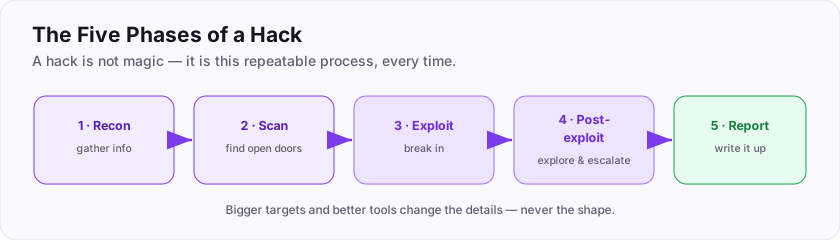
You just did the first step (recon) by reading this page's source. Over the next tasks we will walk the *whole* process on a simple practice web target, one small step at a time. Nothing here requires talent or genius — only curiosity and patience. If you can follow a recipe, you can hack.
Flag: ASEC{its_a_process}
Hacking is best understood as a repeatable ___ rather than magic? (one word)
+10 ptsNeed a hint?
A series of steps you follow every time.What is the flag for this task?
+10 ptsNeed a hint?
It is in bold at the end.Always Get Permission First
The rule that comes before everything
Before *any* of the steps that follow, one thing must be true: you have permission to test the target. Everything in this room is safe because you are practising on this site and on lab machines that exist to be hacked.
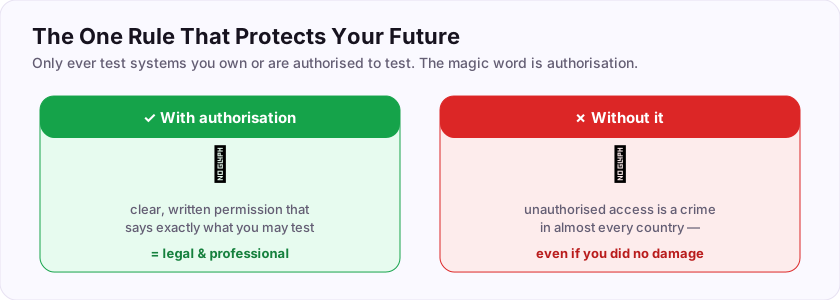
Running these same techniques against a system you do not own or have written authorization for is illegal — the identical action is a lesson in one place and a crime in another. The only difference is permission. So the golden rule: get explicit authorization (a signed scope, a bug-bounty program, or your own lab) *before* you touch anything.
Flag: ASEC{permission_first}
Before testing any system, the one thing you must always have is ___? (one word)
+10 ptsNeed a hint?
Also called authorization.What is the flag for this task?
+10 ptsNeed a hint?
It is in bold at the end.Meet Your Target
Know what you are looking at
The machine you are allowed to test is called the target. For this walkthrough, picture a small practice web application running on a lab machine — a login page, a couple of features, and (as always) secrets its developers left lying around.
Before charging in, define your target clearly: What is its address? What does it appear to do? What is *in scope* (allowed) and *out of scope* (off-limits)? Writing this down keeps you legal and focused. A vague "let's just poke at stuff" is how beginners waste hours and testers get in trouble.
Flag: ASEC{know_your_target}
The machine you are authorized to test is called the ___? (one word)
+10 ptsNeed a hint?
The thing you aim at.What is the flag for this task?
+10 ptsNeed a hint?
It is in bold at the end.The Five Phases of a Hack
The map for everything ahead
Almost every hack, from a beginner box to a professional engagement, follows five phases. This is the map for the rest of this room.
- Reconnaissance — gather information about the target.
- Scanning — find its open ports and services.
- Exploitation — use a weakness to get in.
- Post-exploitation — look around, grab loot, escalate privileges.
- Reporting — write up what you found and how to fix it.
The first phase is recon, and it is where you will spend a surprising amount of time — the more you learn before attacking, the easier every later phase becomes.
Flag: ASEC{five_phases}
What is the FIRST phase of a hack? (one word)
+10 ptsNeed a hint?
Short for reconnaissance — gathering info.What is the flag for this task?
+10 ptsNeed a hint?
It is in bold at the end.Passive Recon: Look Without Touching
Learn a lot before sending a single packet
Passive reconnaissance means gathering information *without* interacting with the target directly — so it never even knows you are looking.
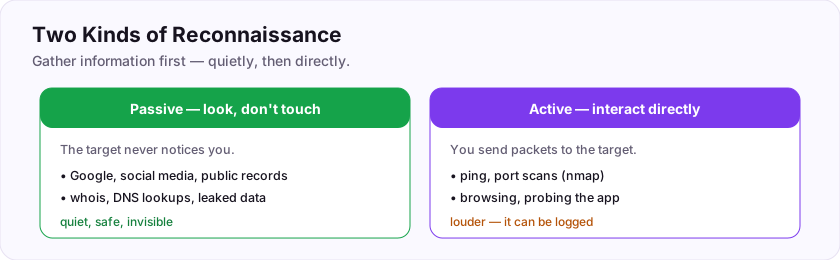
Sources include search engines, the company's own website, social media, public records, DNS and whois data, and past data breaches. For a real target, an attacker might learn employee names, technologies in use, and email formats — all before touching anything. It is quiet, safe, and often astonishingly productive.
Flag: ASEC{look_dont_touch}
Recon that gathers info WITHOUT touching the target is called ___ recon? (one word)
+10 ptsNeed a hint?
The opposite of active.What is the flag for this task?
+10 ptsNeed a hint?
It is in bold at the end.Active Recon: Interacting Directly
Now we actually touch the target
Active reconnaissance means interacting with the target directly — sending it packets and seeing how it responds.
Pinging the machine, scanning its ports, and browsing its website are all active recon. It gives richer, more current information than passive methods, but it is *louder*: the target (and its defenders) can see and log your activity. That is fine in a lab or an authorized test — just remember that active recon leaves footprints.
Flag: ASEC{now_we_touch}
Recon where you interact directly with the target (ping, scans) is called ___ recon? (one word)
+10 ptsNeed a hint?
The opposite of passive.What is the flag for this task?
+10 ptsNeed a hint?
It is in bold at the end.Finding the Target's IP Address
Turning a name into a number
Computers find each other by IP address, not by name. When you know a target's name (like target.site), your first active step is often to resolve it to its IP.
$ ping target.site
PING target.site (10.0.0.9): 56 data bytes
$ nslookup target.site
Address: 10.0.0.9
Both ping and nslookup reveal the IP behind a name. That address, 10.0.0.9, is what you will point your scans and tools at. Names are for humans; the network runs on numbers.
ping or nslookup. Tools work against the IP address, not the name.Flag: ASEC{names_to_numbers}
A simple command that shows a host is reachable and reveals its IP is ___? (one word)
+10 ptsNeed a hint?
It bounces a packet off the host.What is the flag for this task?
+10 ptsNeed a hint?
It is in bold at the end.Checking It's Alive: ping
Is anyone home?
Before scanning a target, confirm it is actually up. ping sends a tiny packet and waits for a reply.
$ ping -c 4 10.0.0.9
64 bytes from 10.0.0.9: icmp_seq=1 ttl=64 time=0.5 ms
Replies mean the host is alive and reachable. (Some machines are configured not to answer pings, so silence does not always mean "down" — but a reply is a solid "yes, it's there".) It is the quickest sanity check in your toolkit.
ping <ip> checks whether a host is up and reachable. A reply is a green light to start scanning.Flag: ASEC{are_you_there}
Which command checks whether a host is up by bouncing a packet off it?
+10 ptsNeed a hint?
Like sonar.What is the flag for this task?
+10 ptsNeed a hint?
It is in bold at the end.Your First Port Scan
Knocking on every door
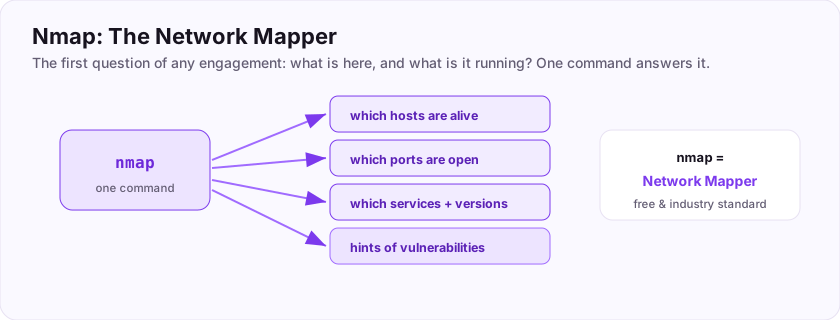
Now for phase two: scanning. Nmap knocks on the target's ports to see which are open and what is listening.
$ nmap 10.0.0.9
Starting Nmap...
PORT     STATE  SERVICE
22/tcp   open   ssh
80/tcp   open   http
You point Nmap at the IP and it reports the open doors. This is one of the most important commands in all of hacking — you cannot attack a service you do not know is running, so mapping the open ports comes right after confirming the host is alive.
nmap <ip> scans for open ports and services. It is almost always your first scan of a target.Flag: ASEC{knock_knock}
Which tool do you use to scan a target for open ports?
+10 ptsNeed a hint?
The network mapper.What is the flag for this task?
+10 ptsNeed a hint?
It is in bold at the end.Reading the Scan Results
What the open ports are telling you
A scan result is a to-do list. Each open port means a service is listening there, and each service is a potential way in.
PORT     STATE  SERVICE
22/tcp   open   ssh      <- remote login
80/tcp   open   http     <- a website
3306/tcp open   mysql    <- a database
Read it like a map of the building's doors: SSH (22) is remote login, HTTP (80) is a website, MySQL (3306) is a database. Each open port suggests different attacks. An open port means a service is running that you can investigate.
Flag: ASEC{ports_tell_stories}
An open port means a ___ is listening there that you can investigate? (one word)
+10 ptsNeed a hint?
Like ssh, http, or mysql.What is the flag for this task?
+10 ptsNeed a hint?
It is in bold at the end.Focusing on the Web Server (Port 80)
Where most first hacks happen
Of all the open ports, the website on port 80 is where beginners find the most success — web apps are everywhere and full of mistakes. So we will focus our first real attack there.
Port 80 is the default for plain HTTP web traffic (443 is HTTPS, the encrypted version). Seeing port 80 open means "there is a website here" — so the next move is simple: open a browser and go to http://10.0.0.9. From here on, this walkthrough lives in the browser.
Flag: ASEC{web_is_the_way}
Which port number is the default for plain (HTTP) web traffic?
+10 ptsNeed a hint?
Two digits; 443 is the encrypted one.What is the flag for this task?
+10 ptsNeed a hint?
It is in bold at the end.Browsing the Site Like a User
Walk before you run
The very first thing to do with a target website is simply *use it* — as an ordinary visitor would.
Click every link, visit every page, try every feature, and watch how the site behaves. Note the pages that exist, any login or search boxes, and anything that looks unfinished. This "manual mapping" builds a mental model of the app before you attack it. Beginners who skip straight to tools often miss the obvious front-door weaknesses.
Flag: ASEC{walk_before_you_run}
The first thing to do with a target site is explore it as an ordinary ___? (one word)
+10 ptsNeed a hint?
Just a normal visitor.What is the flag for this task?
+10 ptsNeed a hint?
It is in bold at the end.View Source Again — On the Target
The skill you already have, reused
Remember the first task, where you found a flag in *this* site's source? You do exactly the same on the target.
Press Ctrl+U on each interesting page to read its raw HTML, and search for developer comments, hidden fields, linked files, and API URLs. Developers constantly leave notes, credentials, and hints in the source, assuming nobody reads it. Reading it is free, silent, and endlessly rewarding.
Flag: ASEC{source_never_lies}
Which keyboard shortcut opens the raw page source in most browsers?
+10 ptsNeed a hint?
Control plus the letter U.What is the flag for this task?
+10 ptsNeed a hint?
It is in bold at the end.The Developer Tools Network Tab
Watch the conversation
View-source shows the finished page, but the Network tab in Developer Tools (F12) shows the live *conversation* between your browser and the server.
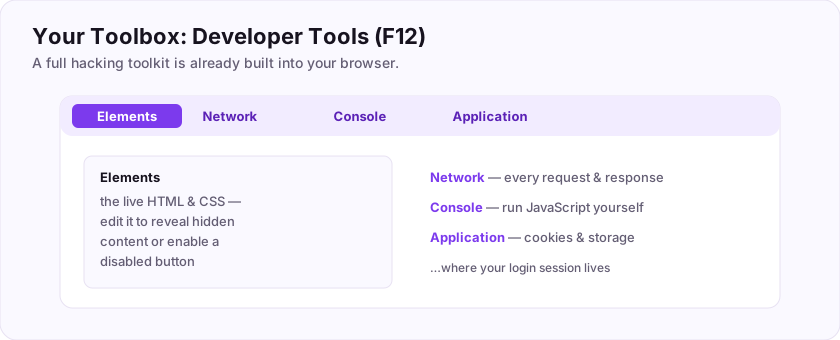
Open F12, click Network, and reload the page. You will see every request the site makes — pages, images, and crucially any hidden API calls carrying data behind the scenes. Click one to see exactly what was sent and received. This reveals functionality that is not visible on the page itself, which is often where the interesting bugs live.
Flag: ASEC{watch_the_requests}
Which Developer Tools tab shows every request the page sends and receives?
+10 ptsNeed a hint?
It is next to Elements and Console.What is the flag for this task?
+10 ptsNeed a hint?
It is in bold at the end.Finding Hidden Pages: robots.txt
A file that hands you a map
Many sites have a file at /robots.txt meant to tell search engines which pages to skip. Ironically, it often *lists the very pages the owner wants hidden*.
$ curl http://10.0.0.9/robots.txt
User-agent: *
Disallow: /admin
Disallow: /backup
Disallow: /secret-notes
Just visit http://target/robots.txt. Every Disallow line is a hint pointing at a page worth checking. It is one of the easiest, most reliable early wins in web recon.
/robots.txt — its "Disallow" list frequently reveals hidden admin and backup pages.Flag: ASEC{robots_spill_secrets}
Which file, meant for search engines, often lists pages the owner wanted hidden? (include the extension)
+10 ptsNeed a hint?
robots dot something.What is the flag for this task?
+10 ptsNeed a hint?
It is in bold at the end.Directory Discovery
Find pages nobody linked to
Not every page is linked from the site or listed in robots.txt. To find the rest, tools like Gobuster or ffuf rapidly guess common names from a wordlist.
$ gobuster dir -u http://10.0.0.9 -w common.txt
/admin      (Status: 200)
/uploads    (Status: 301)
/config.bak (Status: 200)
This is called directory discovery (or content brute-forcing): the tool tries each word as a path and reports which ones exist. Hidden admin panels, backups, and forgotten test files surface here constantly — and any one of them can be the way in.
Flag: ASEC{find_the_hidden_doors}
Guessing unlinked pages with a wordlist is called directory ___? (one word)
+10 ptsNeed a hint?
Also called content brute-forcing.What is the flag for this task?
+10 ptsNeed a hint?
It is in bold at the end.Discovering a Login Page
A door with a lock
Your discovery turned up /admin, and visiting it shows a login page — a form asking for a username and password.
A login page is exciting for an attacker because it is a direct gateway to privileged features, and it *takes your input* — which, as you will see, is where things get interesting. From here you have several angles: try default or guessed credentials, look for a way to bypass the check, or attack the input itself.
Flag: ASEC{a_door_appears}
A page that asks for a username and password is called a ___ page? (one word)
+10 ptsNeed a hint?
You do this to access an account.What is the flag for this task?
+10 ptsNeed a hint?
It is in bold at the end.Trying Default Credentials
The lock that was never changed
Before anything clever, try the obvious: many systems ship with default credentials that nobody changed.
Classic combinations to try on an admin login:
admin/adminadmin/passwordroot/rootadmin/ (blank)
The username admin with a weak or default password gets attackers in more often than you would believe. It costs seconds to try and sometimes ends the whole engagement right there. Always try the easy thing first.
Flag: ASEC{try_the_obvious}
What is the most common default administrator username to try first?
+10 ptsNeed a hint?
Five letters; short for administrator.What is the flag for this task?
+10 ptsNeed a hint?
It is in bold at the end.Understanding HTTP Requests
How the login actually talks
When you press "Log in", your browser sends an HTTP request to the server. Understanding it is key to attacking it.
There are two main methods:
- GET — asks for a page; its data rides in the URL (
?id=5). - POST — submits data in the request body, used for logins and forms.
A login form almost always uses POST, sending your username and password in the request body. Knowing this lets you find, read, and later modify exactly what is being sent — the foundation of the next few steps.
Flag: ASEC{how_the_web_talks}
Which HTTP method does a login form use to submit your username and password?
+10 ptsNeed a hint?
The opposite of GET; data goes in the body.What is the flag for this task?
+10 ptsNeed a hint?
It is in bold at the end.Intercepting a Request
Pause the message mid-flight
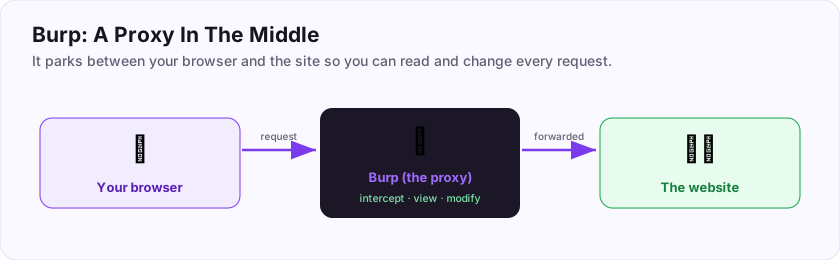
Here is where Burp Suite shines. Set it as your browser's proxy and turn on "Intercept", and the login request *pauses* in Burp before reaching the server — where you can read and change it.
That means you can see the exact username=...&password=... your browser is about to send, and edit it. The site's front-end checks (like "password must be 8 characters") happen in your browser and can be bypassed entirely by changing the request *after* them. Intercepting is the moment you stop being a normal user and start being a tester.
Flag: ASEC{pause_and_peek}
Which tool sits between your browser and the site so you can intercept and modify requests?
+10 ptsNeed a hint?
Burp ___ (Suite).What is the flag for this task?
+10 ptsNeed a hint?
It is in bold at the end.Spotting User Input
Every input is a door
The core question of web hacking is: "Where can I send data to the server?" Every such place is part of the attack surface.
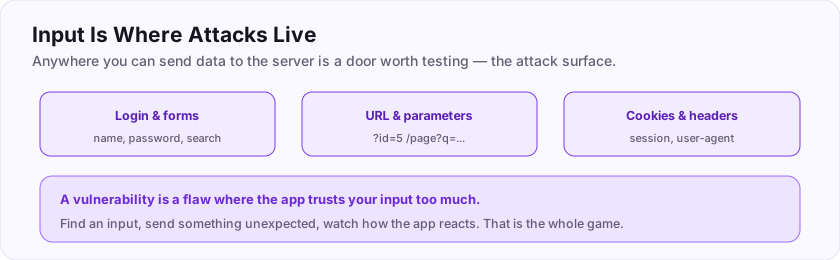
Inputs are everywhere: login fields, search boxes, URL parameters (?id=5), cookies, and headers. Each one is data you control that the server will process. Whenever you find an input, the reflex is to send it something *unexpected* and watch how the app reacts. Finding all the inputs is half the battle.
Flag: ASEC{input_is_a_door}
Any place you can send data to the server (forms, URL parameters) is called user ___? (one word)
+10 ptsNeed a hint?
What you type or send in.What is the flag for this task?
+10 ptsNeed a hint?
It is in bold at the end.What Is a Vulnerability?
The flaw you are hunting for
A vulnerability is a flaw or weakness that lets someone do something they should not — like read another user's data or bypass a login.
Most web vulnerabilities come down to one thing: the app trusts your input too much. When a program takes what you typed and uses it without properly checking it, you can often make it misbehave. An exploit is the specific input or action that takes advantage of a vulnerability. Your job in this phase is to find one.
Flag: ASEC{find_the_flaw}
A flaw or weakness that an attacker can abuse is called a ___? (one word)
+10 ptsNeed a hint?
Often shortened to "vuln".What is the flag for this task?
+10 ptsNeed a hint?
It is in bold at the end.Meeting SQL Injection
Talking straight to the database
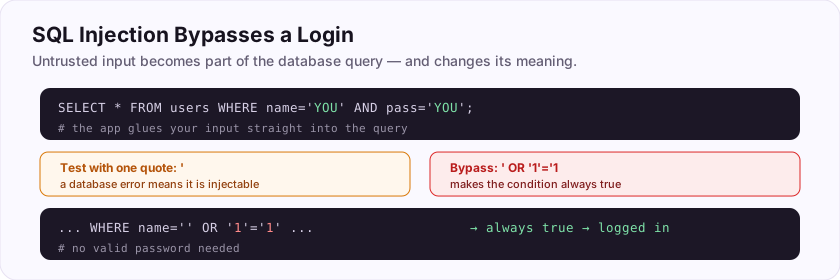
Behind the login is a database, and the app builds a query to check your credentials. If it glues your input straight into that query, you can inject your own database commands. This is SQL injection.
SELECT * FROM users WHERE name='YOU' AND pass='YOU';The YOU parts are your input. If the app does not clean them, whatever you type becomes part of the SQL the database runs — meaning you can change what the query *does*. SQL injection is one of the oldest and most impactful web vulnerabilities, and logins are a classic place to find it.
Flag: ASEC{speak_to_the_database}
The attack that injects your own commands into a database query is called ___ injection? (two words total, first is an acronym)
+10 ptsNeed a hint?
S-Q-L, the database language.What is the flag for this task?
+10 ptsNeed a hint?
It is in bold at the end.Your First Injection: '
The one-character test
How do you know if a login is injectable? Type a single quote — ' — into the username field and submit.
Why a quote? Because the query wraps your input in quotes (name='YOU'). An extra quote breaks the query's structure, and if the app is vulnerable, the database throws an error. That error is your signal: "this input reaches the database unfiltered." A page that errors on a lone ' is practically begging to be injected.
'. A database error means it is likely injectable.Flag: ASEC{one_quote_to_test}
Which single character do you type to test an input for SQL injection?
+10 ptsNeed a hint?
A single quote / apostrophe.What is the flag for this task?
+10 ptsNeed a hint?
It is in bold at the end.Reading the Error Message
Errors are gifts
When your ' triggers a database error, do not ignore it — *read* it. Verbose errors leak valuable information.
You have an error in your SQL syntax near ''' AND pass='' at line 1That message confirms the injection point *and* often reveals the database type, table or column names, and how the query is built. Leaking internal details like this is called information disclosure, and it is a vulnerability in its own right. A well-configured app hides these; a careless one hands you the blueprint.
Flag: ASEC{errors_are_gifts}
When an app leaks internal details in an error, that weakness is called information ___? (one word)
+10 ptsNeed a hint?
It "discloses" secrets.What is the flag for this task?
+10 ptsNeed a hint?
It is in bold at the end.Bypassing the Login
The classic that gets you in
Now the payoff. Into the username field, type:
' OR '1'='1Watch what it does to the query:
SELECT * FROM users WHERE name='' OR '1'='1' AND pass='...';Your OR '1'='1' adds a condition that is always true, so the query returns a user regardless of the password. The login check passes, and you are in — without knowing any real credentials. This single trick has compromised countless real systems.
' OR '1'='1 injects an always-true condition, so the login passes without a valid password. The classic SQLi bypass.Flag: ASEC{always_true}
The SQLi bypass ' OR '1'='1 works because it makes the condition always ___? (one word)
+10 ptsNeed a hint?
1 always equals 1.What is the flag for this task?
+10 ptsNeed a hint?
It is in bold at the end.You're In: The Foothold
The first step inside
You bypassed the login and landed in the admin area. Congratulations — you have a foothold: your first access into the target.
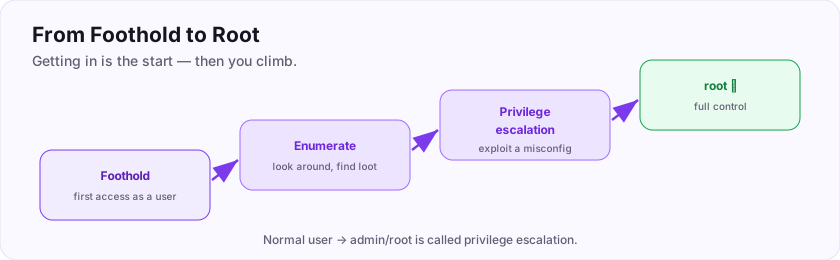
A foothold is exactly that — a toehold, not the summit. You are inside, but usually as a limited user with limited powers. The exciting part is that being inside opens up a whole new set of moves that were invisible from the outside. Everything from here is post-exploitation: making the most of the access you have.
Flag: ASEC{first_foothold}
Your first access into a target system is called a ___? (one word)
+10 ptsNeed a hint?
A toehold; a place to stand.What is the flag for this task?
+10 ptsNeed a hint?
It is in bold at the end.Looking Around (Enumeration)
Now explore, carefully
With a foothold, the next move is enumeration — thoroughly exploring what you can now see and access.
Who am I (whoami)? What files can I read? What other users exist? What is running? What is in the admin panel you just entered? Enumeration is patient, methodical looking-around, and it is where most of the useful discoveries happen. The saying "enumerate everything" exists because attackers who look carefully almost always find the next step waiting for them.
Flag: ASEC{look_around}
Methodically exploring a system after you gain access is called ___? (one word)
+10 ptsNeed a hint?
From "enumerate everything".What is the flag for this task?
+10 ptsNeed a hint?
It is in bold at the end.Finding Sensitive Files
Secrets people leave behind
While enumerating, hunt for sensitive files — the ones that hold credentials and secrets. Config files are the classic jackpot.
$ cat config.php
$db_user = "root";
$db_pass = "S3cr3tP@ss!";
Applications store database passwords, API keys, and tokens in config files, and developers often leave them readable. Finding one can hand you credentials that unlock even more of the system. Also worth checking: backup files, .bak copies, and anything in /home or the web root.
Flag: ASEC{secrets_left_behind}
Which type of file most often holds database passwords and API keys? (one word)
+10 ptsNeed a hint?
Short for configuration.What is the flag for this task?
+10 ptsNeed a hint?
It is in bold at the end.Cracking a Found Hash
Turning a hash back into a password
Sometimes the secret you find is not a plaintext password but a hash — a scrambled, one-way version. To use it, you crack it.
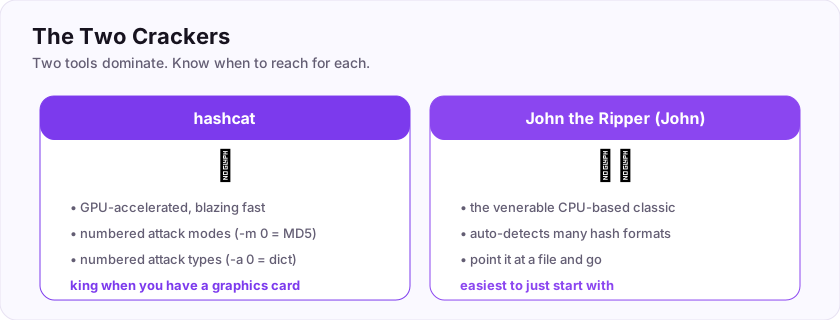
$ john --wordlist=rockyou.txt found_hash.txt
Loaded 1 password hash...
letmein123   (admin)
John the Ripper (and hashcat) guess passwords, hash each guess, and compare it to the one you found — when they match, the password is revealed. Armed with the cracked password, you might log in elsewhere, since people reuse passwords constantly.
Flag: ASEC{crack_it_open}
Which classic tool cracks a password hash using a wordlist?
+10 ptsNeed a hint?
John the Ripper (hashcat also works).What is the flag for this task?
+10 ptsNeed a hint?
It is in bold at the end.What Is Privilege Escalation?
Climbing from user to admin
You got in as a limited user. To fully own the machine, you need to become the administrator — and going from low power to high power is called privilege escalation (or "privesc").
You look for a mistake that lets you cross the line: a misconfigured permission, a program you are allowed to run as admin, a stored password, or a vulnerable service. Privilege escalation is a whole skill of its own, but the idea is simple: find the one flaw that promotes you from ordinary user to the top account.
Flag: ASEC{level_up_to_root}
Going from a normal user to admin/root is called privilege ___? (one word)
+10 ptsNeed a hint?
You escalate your privileges.What is the flag for this task?
+10 ptsNeed a hint?
It is in bold at the end.Becoming Root
The top of the mountain
On Linux, the all-powerful administrator account is called root. Reaching it means total control of the machine.
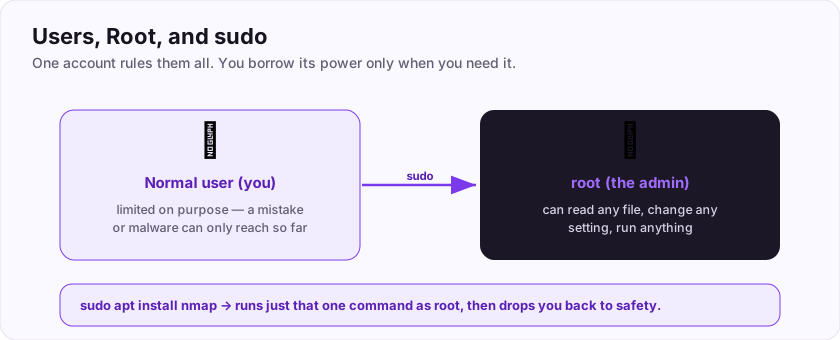
A common first check is sudo -l, which lists what your user is allowed to run as root — a misconfiguration here is a frequent, easy path up. Once you are root, you can read any file, change anything, and the machine is fully yours. In a capture-the-flag room, becoming root is usually how you reach the final, most valuable flag.
sudo -l shows what you can run as root — often the ladder up. Root = total control.Flag: ASEC{root_achieved}
What is the name of the all-powerful administrator account on Linux? (one word)
+10 ptsNeed a hint?
Same word as the top of the filesystem.What is the flag for this task?
+10 ptsNeed a hint?
It is in bold at the end.Capturing the Flag
Proof you did it
The goal of a practice room is to capture a flag — a unique token (like ASEC{...}) placed somewhere only a successful attacker can reach. Finding it proves you completed the challenge.
Flags typically sit in protected spots: a user.txt after your foothold and a root.txt after privilege escalation are the classic pair on many platforms. You have already captured several flags in this very room. That is the entire idea of "Capture The Flag" (CTF): a safe, gamified way to prove you can do each step for real.
user.txt and root.txt are the classic pair.Flag: ASEC{capture_complete}
The unique proof-of-success token you capture in a room is called a ___? (one word)
+10 ptsNeed a hint?
It is in the name "Capture The ___".What is the flag for this task?
+10 ptsNeed a hint?
It is in bold at the end.Covering Tracks vs Ethics
Do the opposite of a criminal
Real attackers try to *hide* what they did. As an ethical hacker, you do the exact opposite: you document every step, in detail, so the owner can understand and verify it.
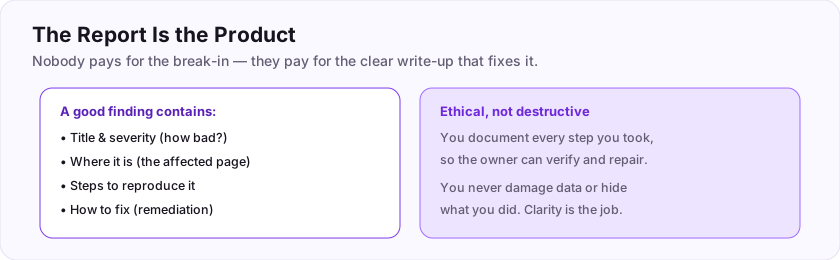
You never destroy data, never hide your activity, and never leave a system worse than you found it. If you created a test account or a file, you note it so it can be cleaned up. This honesty is the entire difference between a penetration tester and a criminal — the same actions, but one documents and repairs while the other conceals and harms.
Flag: ASEC{document_not_destroy}
Unlike a criminal who hides their tracks, an ethical hacker ___ every step? (one word)
+10 ptsNeed a hint?
You write it all down (documents).What is the flag for this task?
+10 ptsNeed a hint?
It is in bold at the end.Writing It Up: The Report
The real deliverable
Here is a surprise for many beginners: in professional security, the report is the product. Nobody pays for the break-in itself — they pay for a clear write-up that lets them fix the problems.
Your report tells the story: what you found, how serious it is, exactly how to reproduce it, and how to fix it. All those notes you took along the way (remember that habit?) become the raw material. A brilliant hack described in a confusing report helps no one; a clearly written report is what actually makes a system safer.
Flag: ASEC{the_report_is_the_product}
In a professional penetration test, the final deliverable the client pays for is the ___? (one word)
+10 ptsNeed a hint?
The written write-up.What is the flag for this task?
+10 ptsNeed a hint?
It is in bold at the end.Anatomy of a Good Finding
How to write up what you found
Each issue in your report is a finding, and a good one has a clear structure.
A strong finding includes:
- Title & severity — what it is and how bad (critical/high/medium/low).
- Location — the exact page or parameter affected.
- Steps to reproduce — so anyone can confirm it.
- Remediation — how to fix it (e.g. "use prepared statements to stop SQL injection").
That last part matters most: your job is not just to break things but to explain how to fix them. A finding that tells the client precisely how to repair the flaw is worth far more than one that just says "it's broken."
Flag: ASEC{explain_and_fix}
Beyond describing a flaw, a good finding must tell the client how to ___ it? (one word)
+10 ptsNeed a hint?
Also called remediate.What is the flag for this task?
+10 ptsNeed a hint?
It is in bold at the end.The Full Kill Chain, Reviewed
Look how far you came
Let us trace the whole journey — the sequence attackers follow is often called the kill chain.
You did all of it:
- Recon — read the source, gathered info, defined the target.
- Scan — pinged, ran Nmap, found the web server.
- Foothold — mapped the site, found a login, bypassed it with SQL injection.
- Post-exploit — enumerated, found secrets, cracked a hash, escalated to root, captured the flag.
- Report — documented everything and wrote it up with fixes.
That end-to-end sequence is the kill chain, and you now understand every link. Real targets are harder, but the shape is exactly this.
Flag: ASEC{the_whole_chain}
The full step-by-step sequence attackers follow is called the kill ___? (one word)
+10 ptsNeed a hint?
A series of connected links.What is the flag for this task?
+10 ptsNeed a hint?
It is in bold at the end.Practice Legally, Forever
Where to keep going, safely
You now have real skills — and the responsibility that comes with them. The rule never changes: only ever hack systems you own or are authorized to test.
Places to practise legally and endlessly:
- This platform's rooms and labs.
- Your own Kali + vulnerable-target lab from the setup room.
- Capture-the-flag events and intentionally vulnerable apps (Juice Shop, DVWA).
- Bug bounty programs, where companies invite testing within clear rules.
There is a lifetime of legal targets. There is never a good reason to touch one you are not authorized to.
Flag: ASEC{stay_on_the_right_side}
You must only ever hack systems you own or are ___ to test? (one word)
+10 ptsNeed a hint?
You have permission / authorization.What is the flag for this task?
+10 ptsNeed a hint?
It is in bold at the end.You Did It — What Happens Next
That was a real hack
Seriously. You just did reconnaissance (looking closely), inspected what the target sent you, and extracted something hidden. Recon then inspect then extract is the core loop behind an enormous amount of real-world hacking — you will repeat that pattern for the rest of your journey, just with bigger targets and better tools.
Here is what to do now:
- Start the Cyber Security 101 path for the fundamentals.
- Keep a running notes file of commands and tricks you learn.
- Come back to the Fundamentals In Depth path for illustrated deep dives.
Your graduation flag from Start Here: ASEC{just_the_beginning}
What is your graduation flag for the Start Here path?
+15 ptsNeed a hint?
It is in bold at the end.Reviews
No written reviews yet. Be the first once you have played the room.