Network Fundamentals
Before you attack or defend a network, you need to know how packets move. This room covers the OSI model, IP addresses, ports, and the everyday tools used to test connectivity.
Networking, Now With Tools
From knowing to doing
You already understand the big ideas — IP addresses find machines, ports find services, and data travels in packets up and down the OSI layers. This room is about the other half: actually using the network with a handful of simple command-line tools.
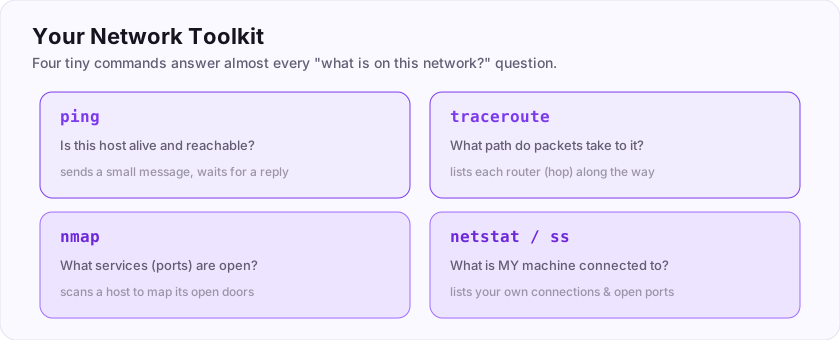
Whether you attack or defend, the same everyday tools come up again and again:
- ping — is this host alive?
- traceroute — what path do packets take to reach it?
- nmap — what services (ports) are open on it?
- netstat / ss — what is *my* machine connected to?
None of them are scary; each is one short command. By the end of this room you will be able to look at any machine on a network and start answering "what is it, and what is it running?"
Flag: ASEC{tools_make_it_real}
Is everyday network testing done with command-line tools like ping and nmap? (yes/no)
+10 ptsNeed a hint?
That is what this room teaches.What is the flag for this task?
+10 ptsNeed a hint?
It is in bold at the end.The layers beneath
A quick recap of the model
Networking is organised into layers, and the classic map is the OSI model with its 7 layers, from physical cabling at the bottom to the application at the top.
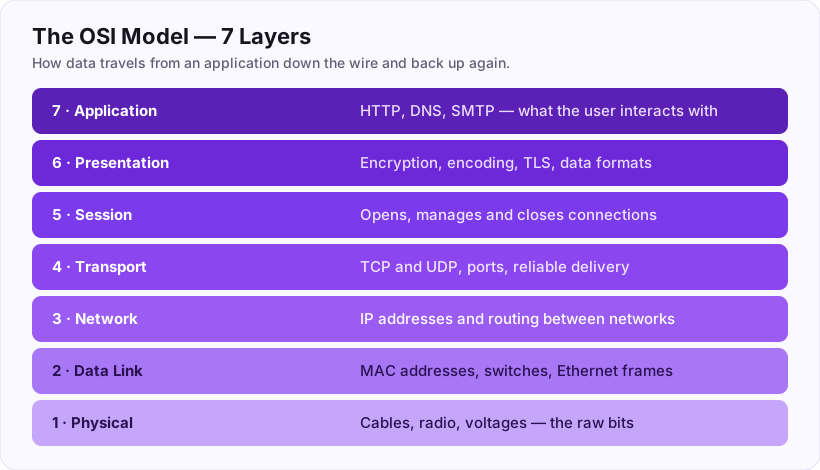
The layer you will care about most as you use tools is layer 4, the transport layer, where two protocols do most of the work:
- TCP — connection-oriented and reliable. It does the three-way handshake and guarantees delivery. The web, SSH and email use it.
- UDP — connectionless and fast, with no guarantees. Video calls and DNS use it.
So the OSI model has 7 layers, and the reliable, connection-oriented layer-4 protocol is TCP.
How many layers are in the OSI model?
+10 ptsNeed a hint?
Please, Do Not Throw Sausage Pizza Away.Which layer 4 protocol is connection-oriented and reliable?
+10 ptsNeed a hint?
It performs a three-way handshake.TCP vs UDP: Reliable vs Fast
Two ways to send, two trade-offs
Both TCP and UDP live at the transport layer, but they behave very differently, and knowing which is which explains a lot about how tools and attacks work.
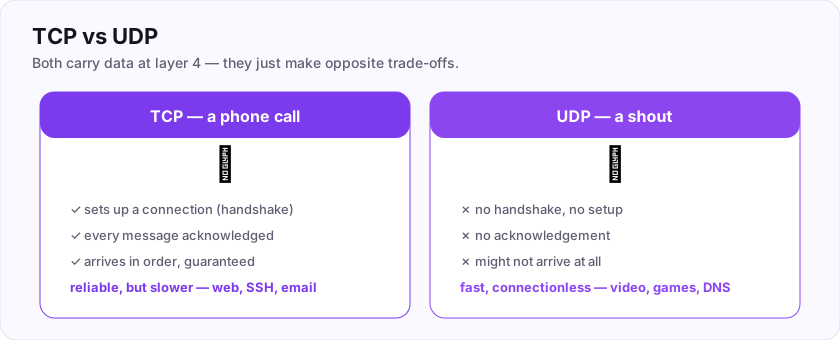
- TCP is like a phone call: you set up the connection (the handshake), confirm the other side is listening, and every word is acknowledged. It is reliable but slower.
- UDP is like shouting a message: you just send it and hope it arrives. There is no handshake and no guarantee, which makes it fast and connectionless — perfect for live video, games, and DNS lookups where speed beats perfection.
The fast, connectionless protocol with no handshake is UDP.
Why a hacker cares
Port scanners behave differently for each: TCP ports answer the handshake (easy to spot open ones), while UDP scanning is slower and noisier. Knowing the difference makes your scans and your troubleshooting far smarter.
Flag: ASEC{tcp_reliable_udp_fast}
Which transport protocol is fast and connectionless, with no handshake? (three letters)
+10 ptsNeed a hint?
The opposite of TCP.What is the flag for this task?
+10 ptsNeed a hint?
It is in bold at the end.Talking to hosts
The first questions you ask a machine
When you meet a new host, two classic tools start the conversation.
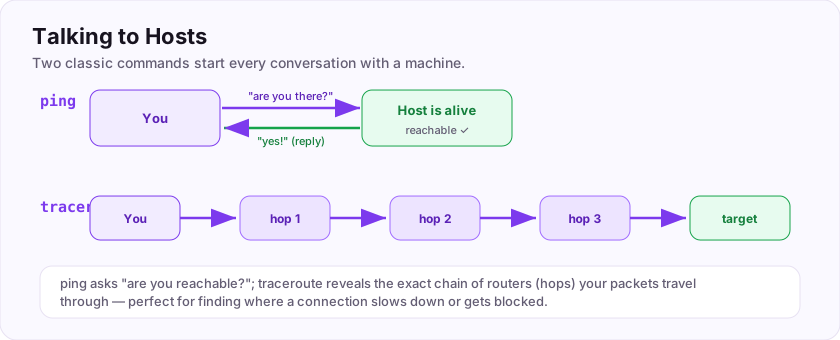
- ping — sends small ICMP "echo request" messages and waits for a reply. If it answers, the host is reachable. It is the command that sends ICMP echo requests to test connectivity.
$ ping example.com
64 bytes from 93.184.x.x: time=12.3 ms- traceroute (or
tracerton Windows) — maps every hop (router) between you and the target, which helps you see where a connection slows down or dies.
Once you know a host is alive, you ask what it is running — and services listen on numbered ports. The one to remember first: HTTPS uses port 443.
Which command sends ICMP echo requests to test connectivity?
+10 ptsNeed a hint?
You literally ping a host.What port does HTTPS use by default?
+10 ptsNeed a hint?
HTTP is 80, the secure version is one number pattern higher.Mapping a Network: Port Scanning
Finding the open doors
A host is alive — now, what is it running? Every service listens on a port, so you find services by checking which ports are open. That is port scanning, and the famous tool for it is nmap.
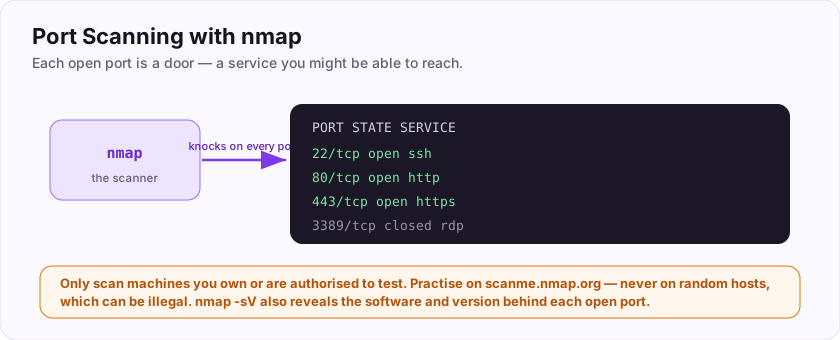
$ nmap example.com
PORT     STATE  SERVICE
22/tcp   open   ssh
80/tcp   open   http
443/tcp  open   https
Each open port is a door you might be able to knock on. nmap can also guess the software and version behind a port (-sV), which tells an attacker exactly what to research — and tells a defender exactly what to lock down.
Flag: ASEC{scan_to_map}
Which popular tool scans a host to discover its open ports? (one word)
+10 ptsNeed a hint?
Network Mapper.What is the flag for this task?
+10 ptsNeed a hint?
It is in bold at the end.Common Ports Worth Knowing
A short list that saves hours
You do not need to memorise all 65,535 ports, but a handful come up constantly. Recognising them instantly tells you what a machine does.
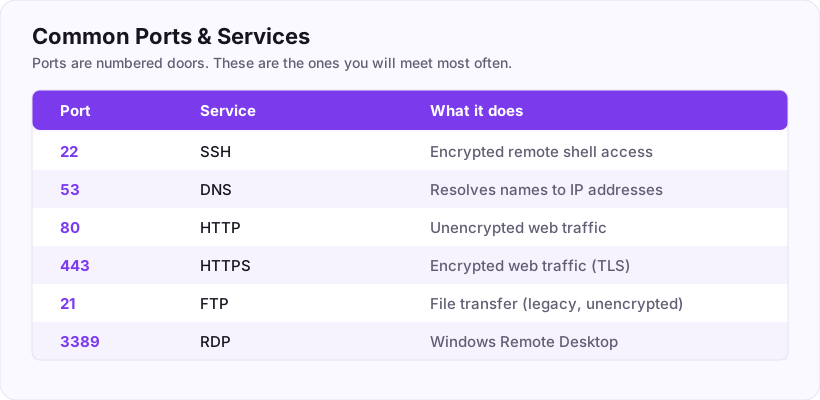
- 22 — SSH (secure remote login)
- 53 — DNS (name lookups)
- 80 — HTTP (unencrypted web)
- 443 — HTTPS (encrypted web)
- 3389 — RDP (Windows remote desktop)
So SSH lives on port 22. When a scan shows port 22 open, you know remote login is available; port 3389 open often means a Windows box you might reach by remote desktop.
Flag: ASEC{know_your_ports}
Which port does SSH use by default?
+10 ptsNeed a hint?
A low, two-digit number.What is the flag for this task?
+10 ptsNeed a hint?
It is in bold at the end.Seeing Your Own Connections
Turn the tools on yourself
The same curiosity applies to your *own* machine. Two everyday commands show what your computer is talking to — invaluable for spotting malware phoning home.
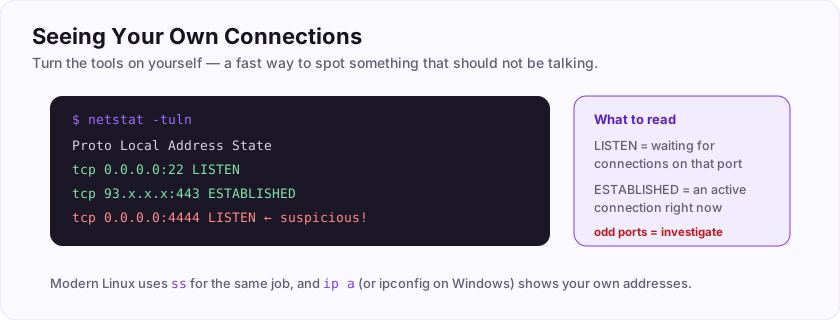
- netstat (or the modern ss on Linux) lists your active connections and which ports are listening:
$ netstat -tuln
Proto  Local Address     State
tcp    0.0.0.0:22        LISTEN
tcp 93.x.x.x:443 ESTABLISHED- ipconfig (Windows) or ifconfig / ip a (Linux) shows your own IP addresses and network settings.
For a defender, an unexpected LISTENING port or a strange ESTABLISHED connection is a red flag worth investigating.
ss) shows your active connections and listening ports — a quick way to spot something that should not be talking.Flag: ASEC{see_your_sockets}
Which classic command shows your machine's active connections and listening ports?
+10 ptsNeed a hint?
Its modern replacement is ss.What is the flag for this task?
+10 ptsNeed a hint?
It is in bold at the end.Putting It All Together: Probing a Host
The recon workflow
Let's combine the tools into the everyday first move against any host: figuring out what it is and what it runs.
- Is it alive? —
pingthe host. If it answers, it is reachable. - How do I get there? —
traceroutemaps the path, useful if something is blocking you. - What is open? —
nmapscans its ports to find running services. - What exactly is running? —
nmap -sVidentifies the software and version behind each open port. - Recognise the ports — 22 means SSH, 443 means HTTPS, and so on.
That sequence — reachable, route, open ports, versions — is exactly how both attackers and defenders begin. The very first step is always the humble ping.
nmap to map its open ports and services. Recon before anything else.Your graduation flag for this room: ASEC{you_can_probe_a_network}
The first step to check whether a host is reachable is which command?
+10 ptsNeed a hint?
It sends ICMP echo requests.What is your graduation flag for this room?
+15 ptsNeed a hint?
It is in bold at the very end.Deep Dive & Field Practice
Think in layers
When something does not connect, the layered model tells you where to look — cable, IP, port, or application.
Map real tools to layers: ping tests reachability (layer 3), a port scan checks services (layer 4), and a browser speaks the application layer (layer 7). This mental model turns "the internet is broken" into a precise, testable question.
The flag: ASEC{layers_all_the_way_down}
At which OSI layer number do ports (TCP/UDP) operate?
+10 ptsNeed a hint?
The Transport layer.What is the flag?
+10 ptsNeed a hint?
Read the last line.Job-Ready Notes
Job-Ready Notes
Tools to know: Nmap, Wireshark, tcpdump, netcat.
Cheat sheet
nmap -sV -sC -p- target        # versions + default scripts, all ports
tcpdump -i eth0 port 80        # capture HTTP traffic
Interview practice
- Walk through the TCP three-way handshake.
- What is the difference between TCP and UDP?
- What does a SYN (half-open) scan do and why use it?
Reviews
No written reviews yet. Be the first once you have played the room.